GGUF Quantization on a GTX 1080 Ti and RTX 3090, Measured: Q8_0 to Q3_K_M, With and Without imatrix
Seven GGUF quants of Qwen3-8B measured against BF16 on a GTX 1080 Ti and an RTX 3090: KL divergence, speed, VRAM, English and Korean. IQ4_XS was the fastest 4-bit quant on both, and imatrix halved the 4-bit drift.
Rewritten in October 2026. The earlier version of this page gave perplexity and speed figures that I had not measured. Everything below comes from runs on my own hardware, and the scripts and logs are listed at the end.
TL;DR
- IQ4_XS was the fastest quant on the GTX 1080 Ti: 51.3 tokens/s generation against 44.6 for Q4_K_M. The old version of this page claimed IQ quants run 20–25% slower on Pascal. On this build that is wrong.
- The ranking held on an RTX 3090 (added the same day): IQ4_XS 146.3 tokens/s, Q4_K_M 134.3. The lead shrank from 15% to 9%, and Q3_K_M was again slower than every 4-bit quant.
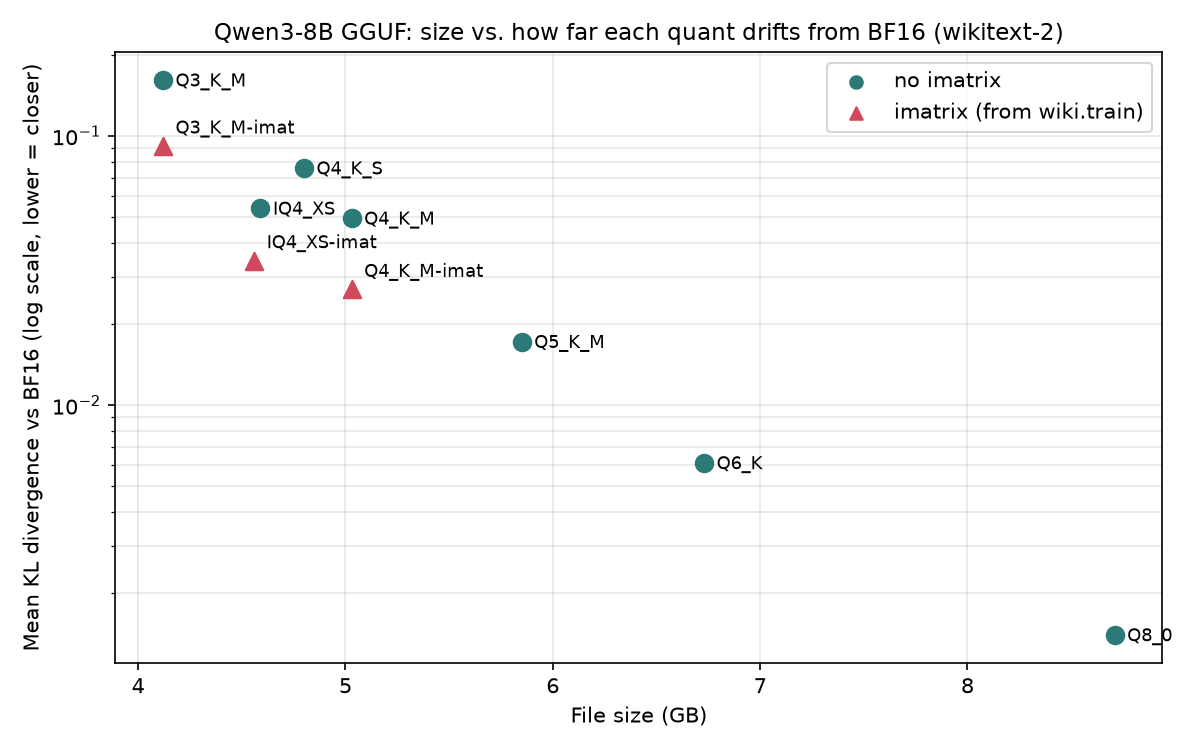
- imatrix roughly halves the drift at 4 bits. Q4_K_M's mean KL divergence from BF16 fell from 0.049 to 0.027 on English text. Speed is unchanged.
- For an 11 GB card, my pick is IQ4_XS with an imatrix: 4.56 GB, KLD 0.034, about 52 tokens/s. For a little more quality at 0.5 GB more, take Q4_K_M with an imatrix.
- Q3_K_M is a bad deal here. It is smaller than any 4-bit quant but slower, and its drift is three times Q4_K_M's.
- Korean text was not hurt more than English. The drift was about the same in both.
- A trap: the
PPL(Q)/PPL(base)line thatllama-perplexityprints in KL-divergence mode came out about 0.9% too high in my runs, even for BF16 compared with itself.
Setup
| GPU | GTX 1080 Ti 11 GB (Pascal, sm_61). Speed runs on the second card, which drives no display |
| Software | llama.cpp 6184e92 (9 Oct 2026), built with CUDA 12.0 for sm_61 |
| Model | Qwen3-8B, BF16 GGUF from unsloth/Qwen3-8B-GGUF (Apache-2.0 weights). SHA256 matched the Hugging Face listing |
| Quants | made from the BF16 file with llama-quantize, so every quant shares the same source |
| Reference | BF16 itself, split across two 1080 Tis |
| English text | wikitext-2 test, first 100 chunks of 512 tokens (51,200 tokens) |
| Korean text | 34 Korean Wikipedia articles, revision IDs saved, same 100 × 512 |
| imatrix | built from wikitext-2 train (200 chunks), never from the test file |
I measured three things for quality. Mean KL divergence (KLD) measures how far each quant's next-token probabilities move away from BF16's, and lower is better. Top-1 agreement is how often the quant picks the same most-likely token as BF16. Perplexity change is the usual number, listed for comparison.
Why not perplexity alone? Perplexity only looks at the probability of the one correct token. A quant can shift the whole distribution and still land close on that one number, sometimes even a little lower by luck. KLD compares the full distribution at every position. I saw the two disagree in this test (more on that below).
Results (English)
| Quant | Size | PPL vs BF16 | Mean KLD | Top-1 same | Gen t/s | Prompt t/s | VRAM @ 8K ctx |
|---|---|---|---|---|---|---|---|
| Q8_0 | 8.71 GB | +0.43% | 0.0014 | 98.3% | 32.9 | 1000 | 9.3 GB |
| Q6_K | 6.73 GB | +0.58% | 0.0061 | 96.5% | 35.1 | 886 | 7.6 GB |
| Q5_K_M | 5.85 GB | +1.22% | 0.0172 | 94.4% | 39.5 | 916 | 6.8 GB |
| Q4_K_M | 5.03 GB | +2.63% | 0.0494 | 90.7% | 44.6 | 968 | 6.1 GB |
| Q4_K_M + imatrix | 5.03 GB | +1.15% | 0.0269 | 93.0% | 44.5 | 974 | |
| Q4_K_S | 4.80 GB | +5.19% | 0.0759 | 88.4% | 46.9 | 988 | 5.9 GB |
| IQ4_XS | 4.59 GB | +3.08% | 0.0538 | 90.5% | 51.3 | 1026 | 5.7 GB |
| IQ4_XS + imatrix | 4.56 GB | +1.91% | 0.0344 | 92.4% | 51.9 | 1055 | |
| Q3_K_M | 4.12 GB | +8.63% | 0.1611 | 84.0% | 41.2 | 904 | 5.3 GB |
| Q3_K_M + imatrix | 4.12 GB | +4.43% | 0.0917 | 87.6% |
BF16 perplexity on this text was 10.340. Generation speed is tg256 and prompt speed is pp512 from llama-bench. Each value is the mean of three passes in shuffled order, 10 repetitions each. The three passes agreed to within 0.5 tokens/s for generation and within 5% for prompt processing. The two imatrix speed rows are a single 10-repetition run each. VRAM is the peak nvidia-smi reading during a single 8,192-token llama-perplexity run with the default f16 KV cache. Blank cells were not measured.
Speed: the IQ4_XS result
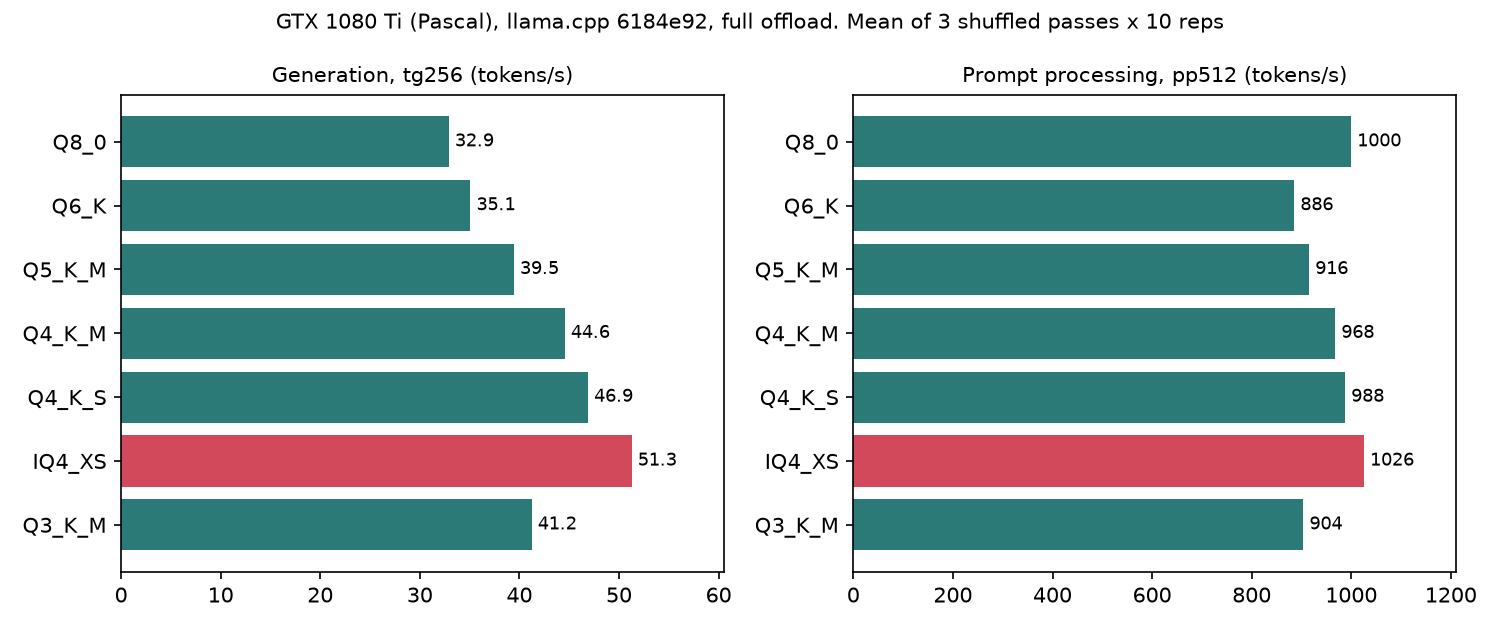
Generation on this card mostly tracked file size: the fewer bytes per token, the faster. IQ4_XS is the smallest 4-bit file and it came out fastest in both generation and prompt processing.
The exception is Q3_K_M. It is the smallest file but generated at 41.2 tokens/s, slower than every 4-bit quant. I did not profile why. The likely suspect is the extra work of unpacking 3-bit blocks, which outweighs the bytes saved on this GPU.
The claim that IQ quants are slow on Pascal may have been true for older llama.cpp builds or other IQ types. I only tested IQ4_XS on one recent build. For that combination, it was the fastest of the seven.
imatrix: half the drift, same speed
An importance matrix (imatrix) tells the quantizer which weights matter most for typical text, so it can spend precision there. I built one from wikitext-2 train data and re-quantized three formats.
| Quant | KLD English (no imatrix → imatrix) | KLD Korean (no imatrix → imatrix) |
|---|---|---|
| Q4_K_M | 0.049 → 0.027 (−46%) | 0.045 → 0.027 (−41%) |
| IQ4_XS | 0.054 → 0.034 (−36%) | 0.049 → 0.036 (−27%) |
| Q3_K_M | 0.161 → 0.092 (−43%) | 0.160 → 0.096 (−40%) |
The imatrix was built only from English text, and it still cut the Korean drift substantially. The Korean gains are a bit smaller, which is what you would expect: the English test text comes from the same source as the imatrix data, so English gets a slight home advantage.
In practice: if you download a 4-bit GGUF, prefer one made with an imatrix. Uploaders usually say in the model card whether they used one.
Does quantization hurt Korean more?
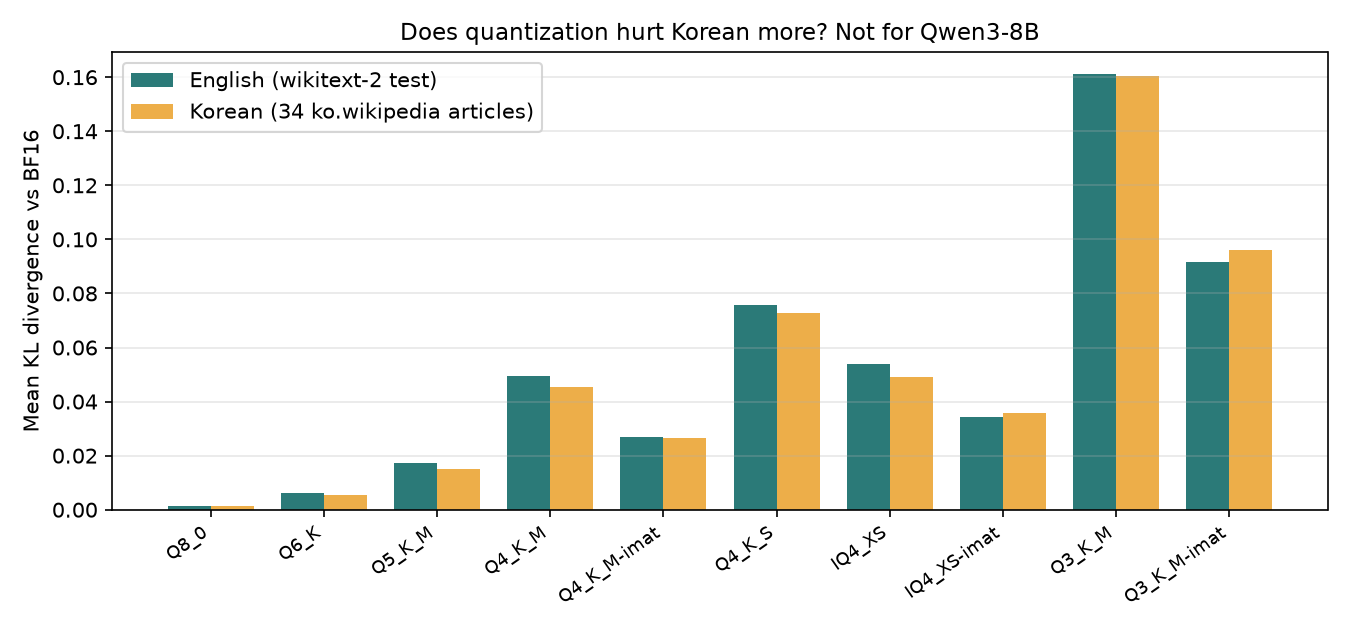
A common worry is that quantization damages non-English text more, because those tokens are rarer in training. For Qwen3-8B on encyclopedic Korean text, I did not see it. Without an imatrix, Korean drift was equal to or slightly lower than English for every quant. With the English-built imatrix, Korean came out marginally higher, which matches the home advantage above.
This is one model with heavy multilingual training and one style of text. A model trained mostly on English could behave differently.
A trap in llama.cpp's KLD output
My first table showed Q8_0 at +1.3% perplexity against BF16, which is far more than Q8_0 usually costs. The mean KLD of 0.0014 said the two models were almost identical, so the two numbers contradicted each other.
To find out which was wrong, I scored BF16 against its own stored reference. The result was KLD 0.000000 and 100% top-1 agreement, as it should be, but Mean PPL(Q)/PPL(base) was still 1.0089.
The cause is in how the reference is stored. To keep the file small, perplexity.cpp saves each position's log-probabilities in 16 bits and clamps every logit more than 16 below the maximum. When the correct next token was one the model found very unlikely, the stored reference makes it look less unlikely than it really was. The PPL(base) read back from the file is therefore too low, and the ratio too high.
What I did instead: I ran BF16 perplexity normally (10.340) and compared each quant's own perplexity against that number. Mean KLD and top-1 agreement are barely affected: the clamped tokens are ones BF16 gave a probability below about one in ten million, and the self-test shows both come out exactly right when the two models are the same.
If you use --kl-divergence, trust the KLD lines and compute the perplexity change yourself.
PPL and KLD disagree sometimes
On the Korean text, IQ4_XS without an imatrix had a smaller perplexity increase than Q4_K_M (+1.96% against +2.55%), but a larger KLD (0.049 against 0.045). One metric says IQ4_XS is closer to BF16, the other says Q4_K_M is. KLD looks at the whole distribution, so I trust it more for ranking quants this close. Rankings built on perplexity alone can flip on differences this small.
On an RTX 3090 (Ampere)
Added 10 October 2026. The obvious question was whether the speed ranking is a Pascal quirk. I ran the identical protocol on an RTX 3090: same llama.cpp commit (6184e92, built for sm_86), same BF16 file (SHA256 checked), the same ten quantized files made the same way, same evaluation texts and the same three shuffled llama-bench passes.
| Quant | 1080 Ti gen t/s | 3090 gen t/s | 3090 / 1080 Ti | 1080 Ti prompt t/s | 3090 prompt t/s | 3090 VRAM @ 8K |
|---|---|---|---|---|---|---|
| Q8_0 | 32.9 | 89.6 | 2.7× | 1000 | 5,417 | 9.5 GB |
| Q6_K | 35.1 | 106.3 | 3.0× | 886 | 4,723 | 7.7 GB |
| Q5_K_M | 39.5 | 120.5 | 3.1× | 916 | 5,027 | 7.0 GB |
| Q4_K_M | 44.6 | 134.3 | 3.0× | 968 | 5,135 | 6.2 GB |
| Q4_K_S | 46.9 | 140.2 | 3.0× | 988 | 5,206 | 6.0 GB |
| IQ4_XS | 51.3 | 146.3 | 2.9× | 1026 | 5,628 | 5.8 GB |
| Q3_K_M | 41.2 | 122.2 | 3.0× | 904 | 4,833 | 5.5 GB |
What carried over:
- The ranking held. IQ4_XS was again the fastest 4-bit quant for both generation and prompt processing, and Q3_K_M was again slower than all of them despite being the smallest file.
- The IQ4_XS lead narrowed, from 15% over Q4_K_M on the 1080 Ti to 9% on the 3090. With an imatrix, IQ4_XS reached 147.7 tokens/s on the 3090; Q4_K_M with an imatrix stayed at 134.3.
- Quality numbers matched. The KL divergences on the 3090 agreed with the 1080 Ti run to within about 1% for the plain quants (Q4_K_M 0.0490 vs 0.0494) and within a few percent for the imatrix ones (Q4_K_M 0.0278 vs 0.0269), whose importance matrix was recomputed on each GPU. That is what you would expect, since quantization quality should not depend on the GPU. The Korean results matched in the same way.
Conditions worth knowing, because they affect the speed numbers:
- The 3090 also drives a Windows desktop (WSL2). VRAM figures above subtract the 0.9 GB the desktop held at idle.
- During the speed passes the card sat at its 420 W power limit most of the time (temperatures 61–79 °C, no hardware thermal throttling). The three passes agreed to within 1% for every quant.
llama-benchran with flash attention on "auto" on both machines (checked in both CSVs). "Auto" may resolve differently on Pascal and Ampere, so compare the prompt-processing numbers within one GPU; across GPUs, read them as rough.
What I would download
- Default (11 GB or 24 GB): IQ4_XS with an imatrix. Smallest of the good quants, the fastest 4-bit quant on both cards, 92% top-1 agreement.
- A bit more quality: Q4_K_M with an imatrix, at the cost of about 0.5 GB and 7 tokens/s.
- Quality first, speed second: Q6_K. Its drift is a tenth of Q4_K_M's and it still fits with room for context.
- Skip: Q3_K_M for an 8B model. It saves under 1 GB over IQ4_XS and costs both speed and quality, on both cards.
For reference, Ollama's qwen3:8b tag on my machine reports Q4_K_M. If you use Ollama with the defaults, the Q4_K_M row is roughly your situation. I did not check whether Ollama's file was made with an imatrix.
Limits
- One model (Qwen3-8B), two GPU generations (Pascal, Ampere), one llama.cpp build.
- 51,200 evaluated tokens per language. The error bars in the logs are small, but this is not a full-dataset run.
- KLD and top-1 agreement measure closeness to BF16. They are not task scores. I did not run MMLU or coding benchmarks.
- The ranking held from Pascal to Ampere; newer architectures (Ada, Blackwell) and other llama.cpp builds may still differ.
Reproduce it
Build and quantize:
cmake -B build -DGGML_CUDA=ON -DCMAKE_CUDA_ARCHITECTURES=61 \
  -DCMAKE_C_COMPILER=gcc-12 -DCMAKE_CXX_COMPILER=g++-12 -DCMAKE_CUDA_HOST_COMPILER=g++-12
cmake --build build -j --target llama-perplexity llama-quantize llama-bench llama-imatrix
./build/bin/llama-quantize Qwen3-8B-BF16.gguf Qwen3-8B-IQ4_XS.gguf IQ4_XS
CUDA 12.0 does not accept GCC 13 as a host compiler, which is why GCC 12 is named explicitly.
Reference and comparison:
# BF16 reference (both GPUs)
./build/bin/llama-perplexity -m Qwen3-8B-BF16.gguf -f wiki.test.raw -c 512 --chunks 100 -ngl 99 \
  --kl-divergence-base base.kld
# each quant (second GPU)
CUDA_VISIBLE_DEVICES=1 ./build/bin/llama-perplexity -m Qwen3-8B-IQ4_XS.gguf -f wiki.test.raw \
  -c 512 --chunks 100 -ngl 99 --kl-divergence-base base.kld --kl-divergence
imatrix and speed:
./build/bin/llama-imatrix -m Qwen3-8B-BF16.gguf -f wiki.train.raw -c 512 --chunks 200 -ngl 99 -o imatrix.gguf
./build/bin/llama-quantize --imatrix imatrix.gguf Qwen3-8B-BF16.gguf Qwen3-8B-IQ4_XS-imat.gguf IQ4_XS
CUDA_VISIBLE_DEVICES=1 ./build/bin/llama-bench -m Qwen3-8B-IQ4_XS.gguf -ngl 99 -p 512 -n 256 -r 10
The -c 512 --chunks 100 settings keep the stored reference at about 8 GB with Qwen3's 152k-token vocabulary. The full test set would need several times that.
Related
관련 글
Doubling Qwen3.6-27B on One RTX 3090: ollama → llama.cpp + MTP, Lever by Lever (35.7 → ~75 tok/s)
6월 9일 · 8 min read
Local LLMThe Prefill Wall: Why MTP's 2× Barely Moves Long-Context Latency (Qwen3.6-27B, RTX 3090)
6월 10일 · 6 min read
Local LLMWhat Actually Runs Well on a GTX 1080 Ti in 2026 (Measured)
6월 12일 · 4 min read
Local LLMGemma 4 QAT on a 1080 Ti: What 'Quantization-Aware' Actually Buys — and Fitting the 12B on 8 GB at 16k
6월 10일 · 6 min read