One Image to a Roblox-Ready 3D Prop on a Single RTX 3090, Using Only Commercially Usable Tools
Six low-poly game props from FLUX schnell → TRELLIS.2 → Blender on one RTX 3090: about 80 seconds per model and an 18.5 GB VRAM peak. Seven things went wrong, from an inner shell that drew a red X on a kitten's mouth to a normal map that was 37% inside-out, and here is how each one was fixed.
TL;DR: I needed six small props for a cat-themed Roblox obstacle course: a kitten, a rubber duck, a life ring, a raft with a paw print, a palm tree and a beach parasol. Each had to be one mesh, at most 10,000 triangles, with one 1024 px texture, and everything had to be usable commercially. The pipeline ran on one RTX 3090:
- FLUX.1 [schnell] (Apache-2.0) draws the input image: ~5 s each.
- TRELLIS.2 (MIT), running ComfyUI's native nodes, turns it into a textured mesh: a median of ~80 s per model end to end. The whole pipeline peaks at 18.5 GB of VRAM (during the FLUX step; TRELLIS.2 itself peaked at 18.1 GB).
- Blender (headless) does the cleanup: one mesh, origin at the bottom center, front facing −Z for Roblox.
I ran this as the director. I set the requirements and the license rule, reviewed the results, and sent work back when it wasn't good enough. Claude Code (an AI coding agent) did the hands-on part on my machine: building the pipeline, running it, and digging into failures. The first results looked bad. Most of that turned out to be the pipeline, not the model. Seven separate problems, each found and fixed, make up the rest of this post.
This is the technical companion. For how I directed the work and where human judgment mattered, see I Handed Game Asset Production to an AI Agent.
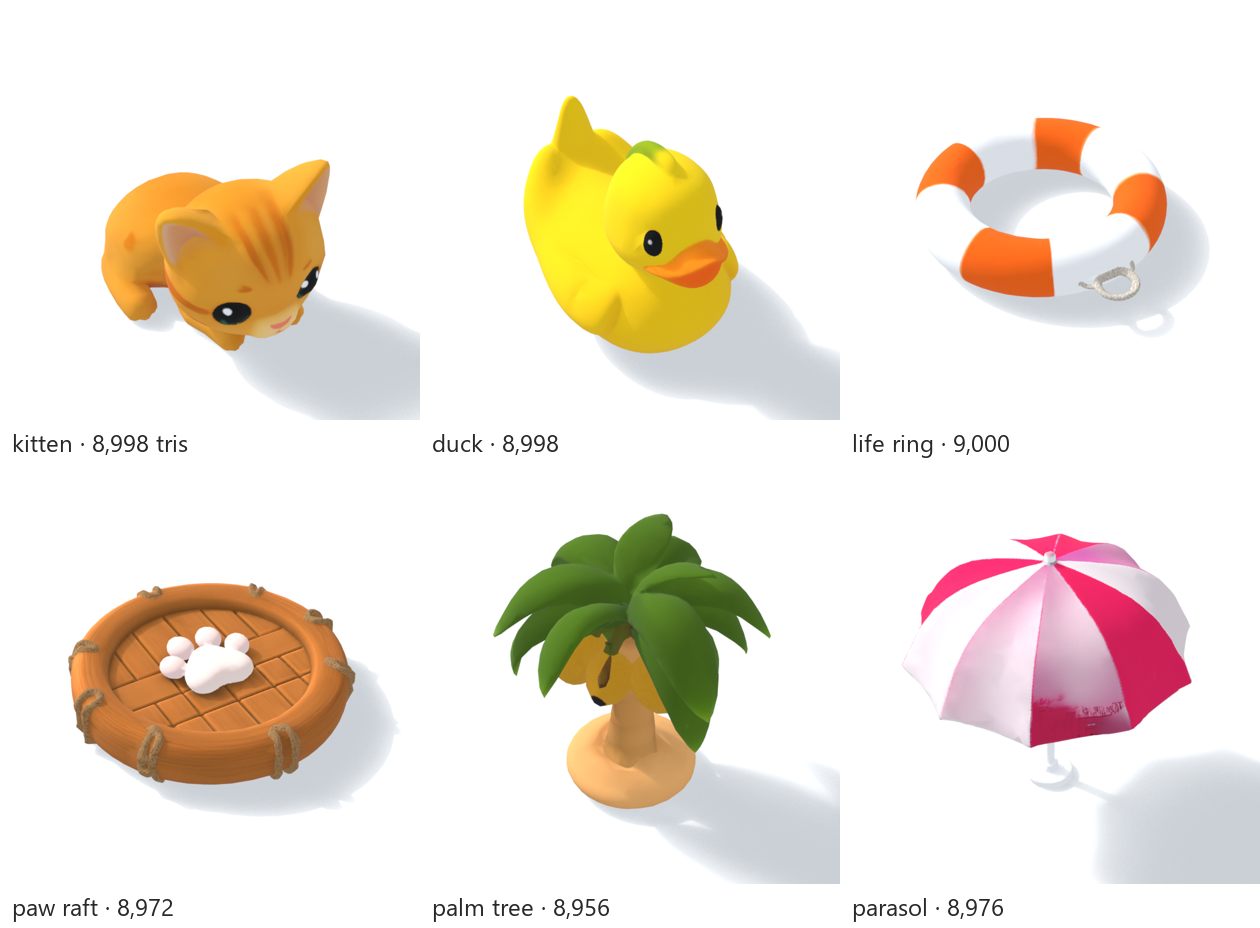
The constraints
| GPU | RTX 3090 24 GB · i9-14900K · 192 GB RAM · driver 591.74 |
| Image → 3D | TRELLIS.2 via ComfyUI v0.39.0 native nodes (separate portable install) |
| Input images | FLUX.1 [schnell] fp8, 4 steps, 1024 × 1024 |
| Cleanup | Blender 5.2.2 portable, headless Python |
| Target | 1 mesh · ≤ 10k triangles · 1 material · one 1024 base-color texture · origin at bottom center · front faces −Z (Roblox's forward; glTF's own convention is +Z) |
The shape rules come from Roblox, which caps a single mesh at 20,000 triangles; I kept each prop under half that. And earlier in this project its moderation removed one of our AI-generated cat assets: a leg uploaded as a separate piece was flagged as sexual content. So every model is a single mesh, and the animals keep their legs tucked in.
Who did what
| My calls | Done by the AI agent |
|---|---|
| What to build: game-ready 3D props, not concept art | Built the FLUX → TRELLIS.2 → Blender pipeline |
| The hard rule: only commercially usable models | Checked each component's license and found the nvdiffrast catch |
| The shape rules: one mesh, ≤ 10k triangles, legs tucked | Ran ~50 images and 40+ conversions, measured everything |
| Rejecting results: the first kitten, the "plastic" look, the pose | Traced each rejection to a cause and fixed it |
| A second round: redo the raft, pick the best kitten from several seeds, test normal maps (but not 2048 px) | Delivered comparison sheets showing what was dropped and why |
| Final sign-off, and placing the props in the game |
Three of the seven problems below were found because I rejected something that passed every automated check. That's the main reason I'd keep a human in this loop.
Licensing first
I made this a hard rule before any quality question. It decided the pipeline more than quality did.
- Input images: FLUX.1 [schnell], Apache-2.0. I didn't use FLUX.1 [dev] (non-commercial). I also left out an image model I'd used elsewhere on this machine, because its license turned out to be non-commercial too.
- Image → 3D: TRELLIS.2 (Microsoft), MIT. There's a catch. The original TRELLIS pipeline bakes the final GLB texture with nvdiffrast, which is under NVIDIA's non-commercial source license. ComfyUI ships a native PyTorch reimplementation of the TRELLIS.2 stages, including texture baking (
BakeTextureFromVoxel), so nvdiffrast never runs. - The conditioning encoder is DINOv3. Its license allows commercial use but excludes military applications. Background removal is BiRefNet (MIT).
- Hunyuan3D was ruled out because its community license excludes South Korea, where I am.
- Blender is GPL, which doesn't apply to what you make with it.
None of this is legal advice. It's the checklist I went through, and I'd suggest anyone doing this read the licenses themselves.
The pipeline
ComfyUI (API calls from a Python script):
LoadImage → RemoveBackground (BiRefNet) → crop to mask → Trellis2Conditioning (DINOv3) → structure / shape / upsample / texture sampling → decode shape → RemeshMesh → DecimateMesh (QEM, 9,000 faces) → smooth normals → UV unwrap 1024 → BakeTextureFromVoxel 1024 → GLB
Then Blender: join into one object, triangulate, smooth shading, rotate so the front faces −Z (Roblox's forward direction; the glTF spec itself uses +Z as front), scale so the longest side is 1.0, and put the origin at the bottom center. It also writes preview renders and checks the result (one mesh, triangle count, material and image count, bounding box).
Measured on the 3090
| Stage | Time | Peak VRAM (whole GPU) |
|---|---|---|
| FLUX schnell, 1 image | 5.1 s median (32 images), ~7.5 s cold | 18.5 GB |
| TRELLIS.2 + remesh + decimate + bake, cold, remesh 512 | 74 s | 18.1 GB |
| Same, warm, remesh 256 | 66 s | 14.3 GB |
| Blender cleanup + checks | ~1.5 s | — |
| Normal-map bake (Cycles, GPU) | 2–7 s | — |
| Per model, end to end (27 runs) | 34–253 s, median 79 s |
The desktop was using 1.8 GB before the run started, so the pipeline itself needed about 16.7 GB. That fits a 24 GB card with room to spare. I haven't tried a 16 GB card. The 253 s outlier was the first model of the day: cold start plus the larger remesh.
Over the two rounds the agent generated about 50 input images and ran a little over 40 image-to-3D conversions to end up with six models, plus a second version of two of them.
Seven things that went wrong
1. A red "×" on the kitten's mouth: the inner shell
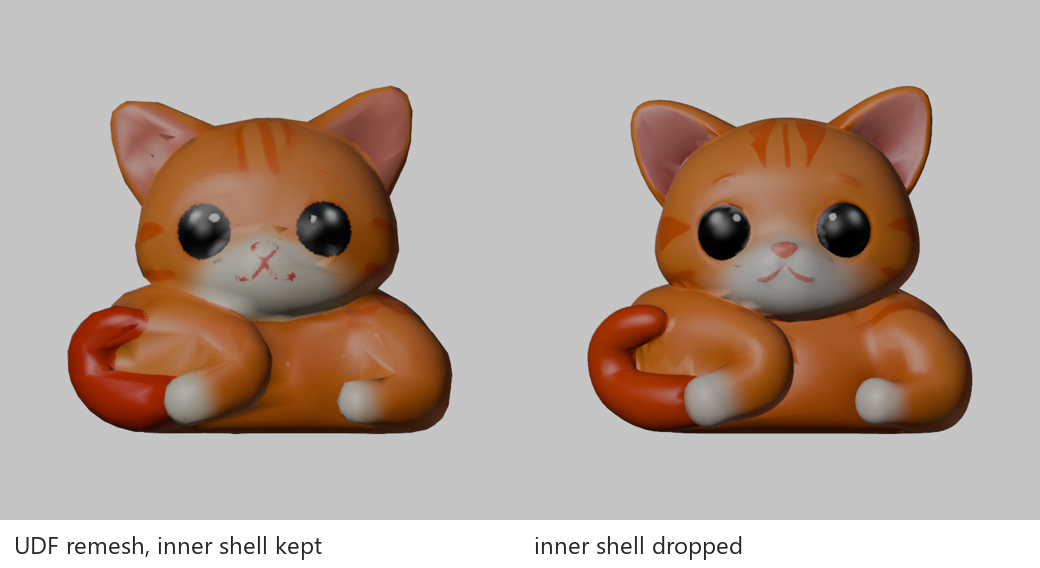
My first reaction to the first kitten (8,931 triangles) was "what is this?" It had a red cross where its mouth should be and dark shards over the body. I sent it back, and the agent traced it to RemeshMesh in UDF mode (unsigned distance field). It builds a surface on both sides of the thin band around the original mesh, which leaves an inner shell just under the outer one. When decimation then cut millions of faces down to 9,000, pieces of the inner shell came through the outer surface. The baked texture showed them as shards and as that "×".
Fix: turn on drop_inverted_components in the remesh node. It removes the inward-facing shell.
2. Finer isn't better: remesh 512 vs 256
Dropping the inner shell fixed the kitten but not the duck. The duck still had shards. The agent counted folded edges (neighbouring faces whose normals point more than ~120° apart) on the decimated mesh. At remesh resolution 512 the duck had 1,099. At 256 it had 11.
At 512 the remesh produces several million faces, and squeezing that into 9,000 folds smooth surfaces over on themselves. At 256 there's much less to squeeze.
| Model | Folded edges at 512 | at 256 |
|---|---|---|
| Duck | 1,099 | 11 |
| Palm tree | 1,115 | 224 |
| Parasol | 254 | 9 |
| Raft | 285 | 100 |
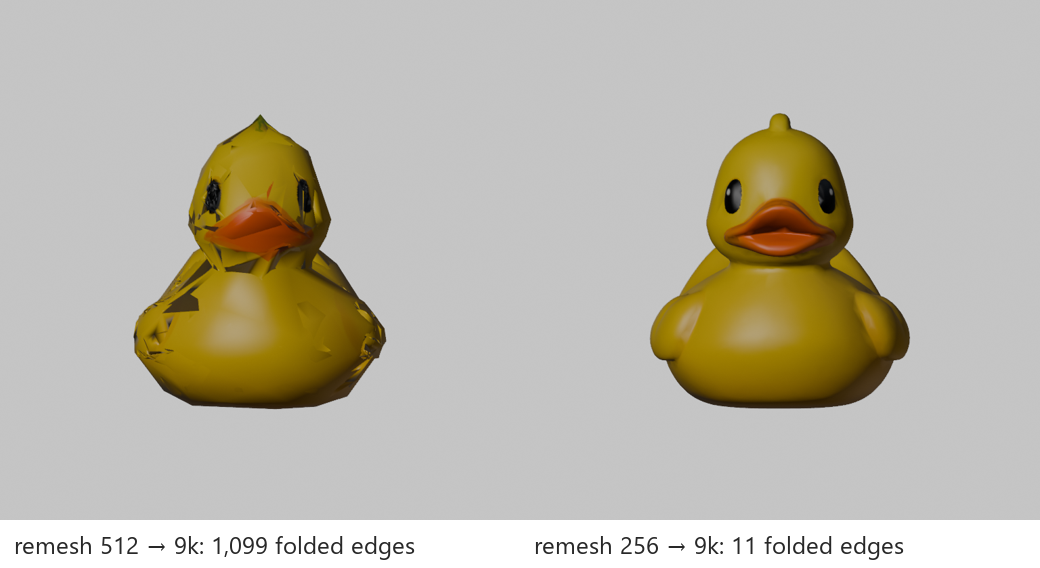
But it's not a rule. In the second round, two kitten candidates collapsed at 256: the decimator stopped at 716 and 1,246 triangles and the faces turned into crumpled paper. Both were fine at 512. The rule now: props at 256, characters at 512, and every model gets an automatic folded-edge and triangle count.
3. "The quality is just bad": the preview renderer
The first previews used Blender's Workbench renderer: flat studio light, no shadows. Everything looked like dull, waxy plastic. I told the agent the quality was just bad and asked whether the model was the problem. Before blaming the model, it re-rendered the same mesh in Eevee with a sun, soft shadows and a floor. It looked like a different asset.
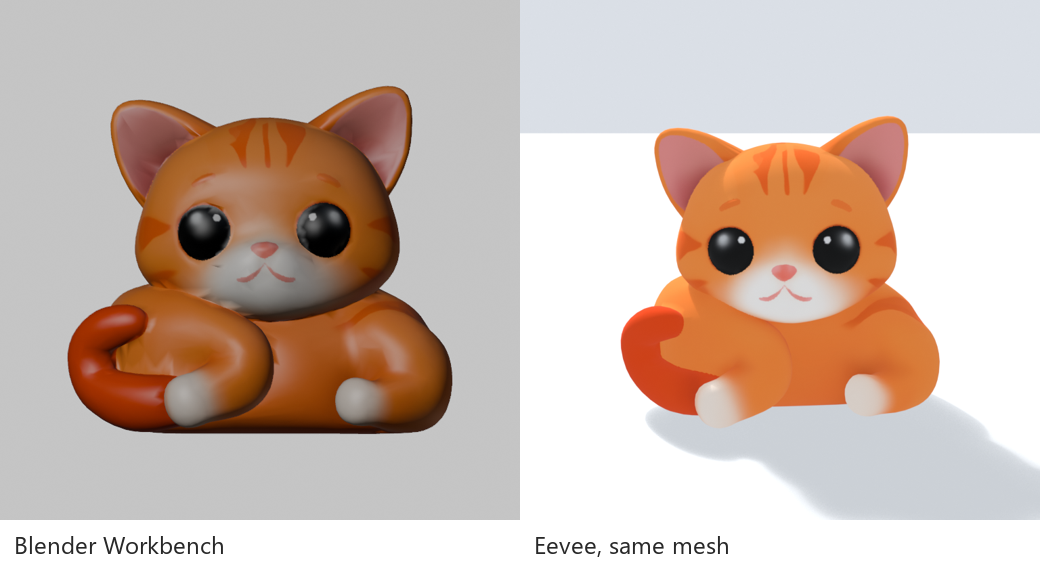
Lesson: judge a game asset in lighting close to the game's. Half of "this looks bad" was the preview.
4. White background plus a white object: the hole that wouldn't open
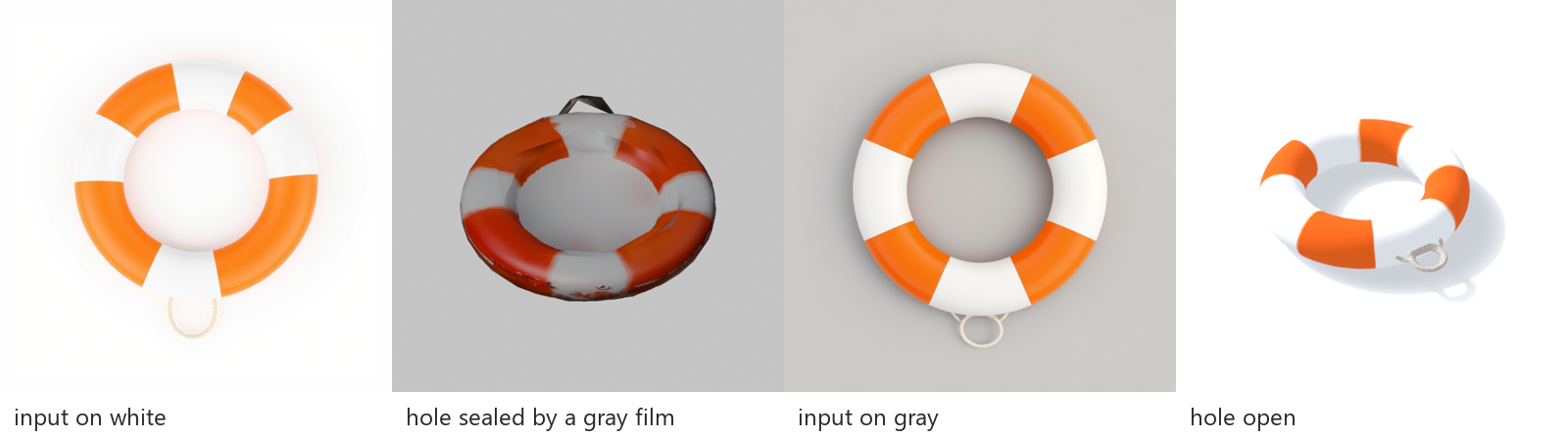
The life ring had orange and white stripes, and the input image had a white background. BiRefNet kept the white center as part of the object, so TRELLIS built a ring with a film across the hole. Drawing the input on a medium gray background fixed it.
Two more fixes for the same model:
- FLUX drew the flat ring from straight above, and TRELLIS built it standing up like a coin on its edge. Blender now lays a model flat automatically when its depth is less than half its height.
- The texture came out red rather than orange, so a small script shifts only the saturated red hues to orange.
5. FLUX can't draw "wedge stripes"
Every prompt for "alternating pink and white wedge stripes" gave concentric rings instead. TRELLIS then turned that into something like tie-dye. Describing the shape instead of naming the pattern worked: "eight triangular fabric panels like pizza slices, alternating solid hot pink and solid white, each panel one flat color."
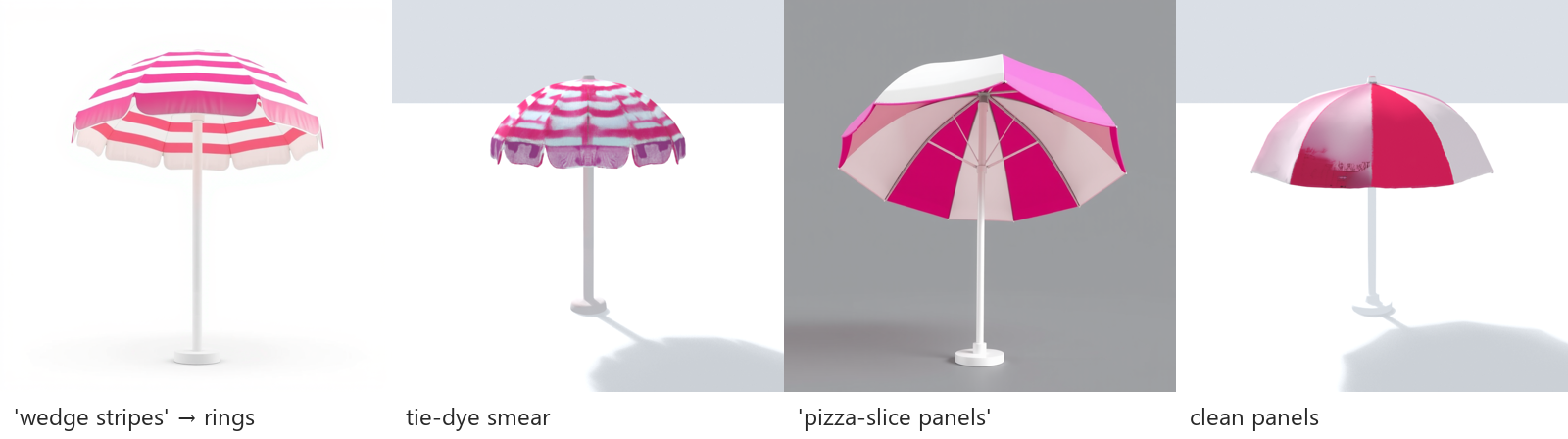
The paw-print raft had a related problem. A straight top-down image produced a raft with no paw print at all: TRELLIS invented a different raft. An angled view on gray fixed that, and in the second round so did spelling out "one big cream paw pad and four small toe pads".
6. A normal map that was 37% inside-out
For the second round I asked for normal maps, which were baked from the high-resolution remesh output onto the 9k mesh (Cycles, selected-to-active, tangent space, 1024). The goal was to keep some surface detail through Roblox's SurfaceAppearance. The first kitten map was 37% olive. In a tangent-space normal map that color means the normal points into the surface.
The remesh output has patches of flipped faces. The renders hid this, but the bake didn't.
Fix: before baking, run normals_make_consistent on the high-res mesh, which got it down to 9%. Then replace any pixel that still points inward with a flat normal (0.5, 0.5, 1). On a closed outer surface an inward normal is always wrong, and a flat one just means "no extra detail here". Final inward pixels: 0%.
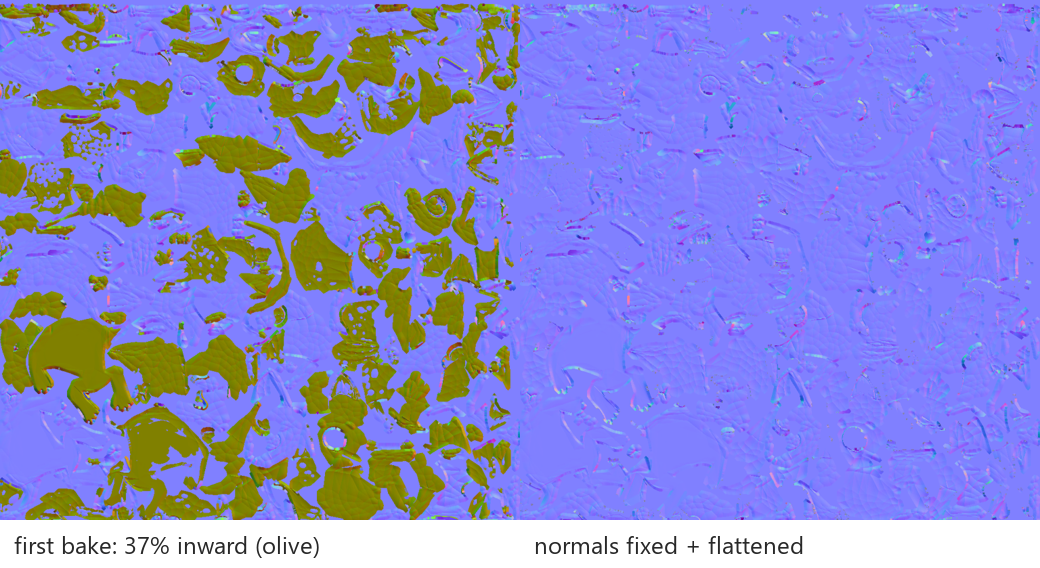
Honestly, the payoff was small: slightly more relief on the forehead and on the raft's rim. It ships as an optional extra next to the main texture.
7. The one no script caught: the kitten's pose
Every automated check passed on the fixed first kitten (re-run with the inner shell dropped): one mesh, 8,981 triangles, bottom-center origin, no shards. Then I looked at the previews and asked: "The legs are pointing the wrong way. Is it turning its head?"
It was. The agent rendered the kitten from five angles and confirmed it: FLUX had drawn the classic three-quarter pose: body lying sideways, head turned to the camera. That reads naturally as a photo, but in 3D, seen from the front, the paws stick out sideways. TRELLIS reproduced the image faithfully. The image was the problem.
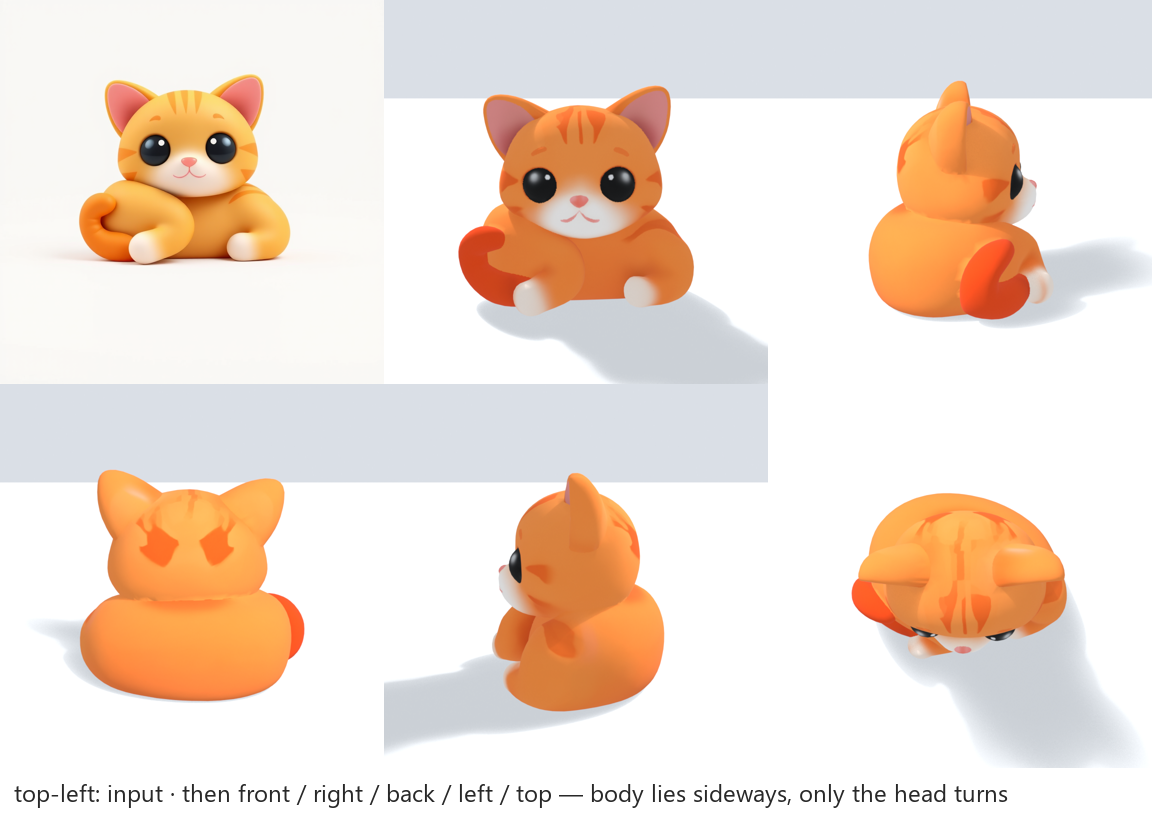
"Bread-loaf pose" didn't help, because FLUX read it as sitting up with paws raised. What worked: "lying flat on its belly, a low wide rounded shape, head facing the same direction as the body, no legs visible." For the second round I asked for several seeds and the clearest face. The agent generated 6–8 images per round, threw out every one whose body went sideways, turned the rest into 3D (seven candidates in the second round), and showed me the rest from five angles (front, both sides, back, top), not one hero shot, with its pick marked. I signed off on it.
Two smaller surprises
- The same seed isn't the same mesh. FLUX was fully reproducible: the same seed gave a byte-identical image. TRELLIS.2 wasn't. Re-running the chosen kitten with the same input and seed gave 10,029 triangles instead of 8,998. That's over my 10k budget (still well under Roblox's 20k cap), even though the decimator's target is 9,000. Treat the target as a hint and check the count afterwards.
- A batch script failed when nothing was wrong.
set -eplus| grep "error-marker"exits with status 1 when there's no error line to match, which stops the script. Add|| true.
What's in the delivery
I asked for everything I'd need to judge the work without opening Blender. For each prop: a GLB (one mesh, one material, a 1024 base-color texture), front, side and three-quarter Eevee previews, and the exact input image. For the two second-round props, also separate _color.png and _normal.png for SurfaceAppearance, and one comparison sheet showing every candidate with the reason it was dropped. The color PNG is checked pixel-for-pixel against the texture inside the GLB, so the two can't drift apart.
Limits
- One image means guessing. Anything the input doesn't show (the back of the duck's head, the underside of the raft, the kitten's tail color) is invented. Some of it came out black or off-color and needed patching: filling black hidden faces, shifting a hue.
- 10k triangles and one 1024 texture blur fine patterns. The raft's wood reads more like a plank grid than real grain.
- I haven't compared against paid tools (Meshy, Tripo and the like). They may well produce cleaner topology and textures. The point here was a local, license-clean pipeline, not the best possible result.
- Six props is a small sample. The fixes above are what worked on these objects. The 256-vs-512 flip shows how much depends on the shape.
What I'd do from the start next time
- Use a gray background for every input, and describe shapes rather than pattern names.
- Generate 6+ seeds per object. Reject inputs whose pose won't survive a rotation before spending GPU time on 3D.
- Use remesh 256 for props, 512 for characters, keep
drop_inverted_componentson, and count folded edges and triangles automatically after every run. - Preview in Eevee from five angles. Never judge from one flat render.
- If baking normal maps, fix the high-res normals first and flatten anything that still points inward.
관련 글
I Handed Game Asset Production to an AI Agent. My Job Turned Out to Be Judgment
10월 8일 · 8 min read
AI/MLRTX 3090으로 Claude 대체하기 — Ollama + Caddy 인증 구축기
2월 23일 · 8 min read
Local LLMI Fine-Tuned a 0.8B Classifier on Korean Business Plans. It Tied My Hand-Written Rules, Then Lost on New Data
10월 4일 · 10 min read
Local LLMQwen-Image-2.1 on One RTX 3090: 495 Generations Into Pixel-Art Game Sprites, Measured (and 6 Gotchas)
10월 1일 · 7 min read