Qwen-Image-2.1 on One RTX 3090: 495 Generations Into Pixel-Art Game Sprites, Measured (and 6 Gotchas)
I moved every sprite for two small Android apps onto a local Qwen-Image-2.1 running on a single RTX 3090. 495 generations later: ~87 s per 1024² image, ~16 GB VRAM with CPU offload, and six gotchas that only showed up once the images had to work as real game assets.
TL;DR — Qwen-Image-2.1 runs on a single 24 GB RTX 3090 with diffusers' enable_model_cpu_offload(): ~16 GB VRAM in use, ~87 s per 1024×1024 image at 30 steps (mean of 445 runs). That's slow for chatting with, but fine for batch work — 30 sprites is a 45-minute job you leave running. The image model was the easy part. Turning outputs into usable 128 px pixel-art sprites took a pipeline, and six gotchas that only showed up in the app, not in the preview.
For the last few weeks I've been building two small Android projects — a hidden-cat puzzle game and a home-screen pixel cat widget. Both need a lot of art: 15 cats × sitting / standing / lying / chubby / an action pose / walk cycles, plus props and backgrounds. I'd been using a hosted image model, then moved everything onto the local GPU that normally serves my LLMs.
The setup
| GPU | RTX 3090, 24 GB (driver 591.74) |
| CPU / RAM | i9-14900K / 192 GB |
| Model | Qwen-Image-2.1 (diffusers format, 31 GB on disk) |
| Stack | PyTorch 2.6 (cu126), diffusers 0.41 dev, QwenImage21Pipeline, bf16 |
| Settings | 30 steps (the model card's examples use 40), true_cfg_scale 4.0, fixed seeds |
Why CPU offload: the diffusion transformer (7.1B parameters) plus the text encoder (8.8B) — both counted from the safetensors headers — come to about 31 GB in bf16. They don't fit 24 GB together. enable_model_cpu_offload() keeps only the active component on the GPU. With 192 GB of system RAM the shuffling is cheap.
One nice detail: in 2.1, text-to-image and image editing are the same pipeline call — pass image=[...] and it edits. One load serves both.
The numbers
| What | Measured |
|---|---|
| Pipeline load (warm disk cache) | 9–12 s |
| Step time at 1024×1024 | 2.1–2.6 s/it |
| One 1024×1024 image, 30 steps | mean 86.9 s, median 92 s (445 runs) |
| All sizes (smaller props included) | 35–103 s, median 85 s (495 runs) |
| VRAM in use during generation | ~16.4 GB |
| 30-image batch | ~45 min |
All timings are at 30 steps, below the model card's 40. Time scales with steps, so expect roughly 1.3× these numbers at the default.
So: the load is negligible if you batch. My generator takes an orders file ([{id, prompt, seed, ref, w, h}, …]), loads once, and works through the list. One image per process would pay the load every time.
The pipeline (what "a sprite" actually means)
The model outputs a 1024² picture. The app needs a 128×128 transparent sprite with hard pixel edges, a small palette, and consistent identity across poses. In between:
- Generate on a flat magenta background (not transparent — see gotcha 2).
- Key out the magenta, alpha strictly 0 or 255 (soft alpha = fake pixel art).
- Fit to 128×128 with nearest-neighbour — never smooth resampling.
- Darken the outline a little, then quantize to a 64-colour palette.
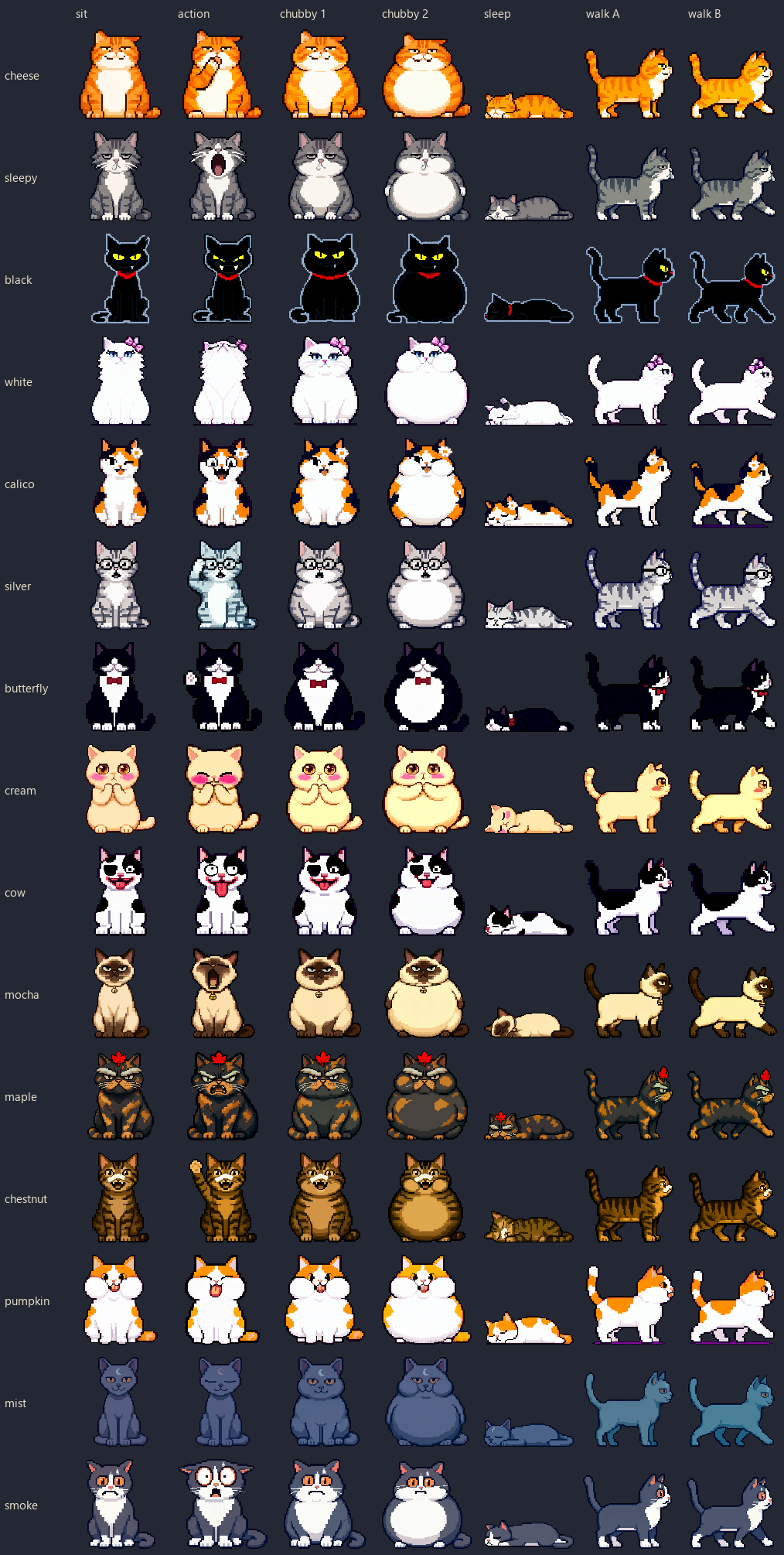
- Derive the other poses by editing, not regenerating: the chosen sitting cat goes in as
image=, and the prompt says "keep the same character… change only the pose". - Build film strips (6 frames × 128 px): breathing via a 1–2 px squash, an action as rest ↔ action frames, a walk from two edited strides.
For the widget's redesign alone that was 30 candidates (2 seeds × 15 cats) → 15 picks → 75 pose edits → 32 walk strides and fixes.
Gotcha 1: "pixel art cat" gives you a realistic cat
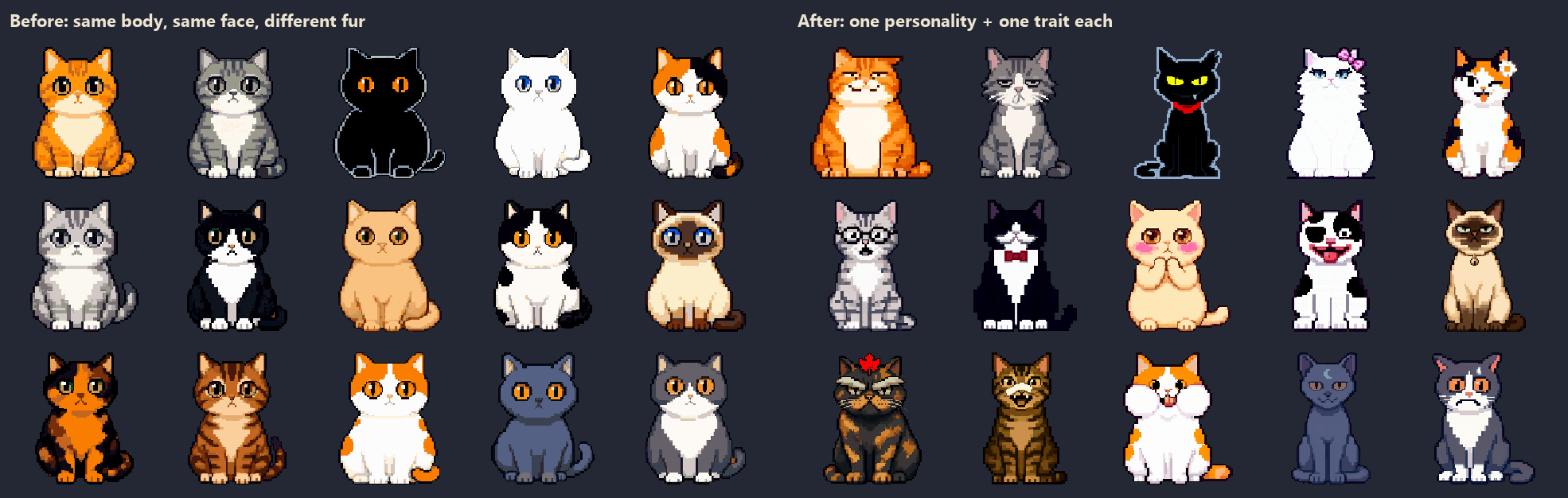
The bare prompt "pixel art cat" came back as a realistic side-view cat drawn in pixels. You have to spell out the style (16-bit sprite, thick dark outline, flat colours, no anti-aliasing) and the proportions — and keep pose words out of the shared style string. When I put "sitting, front view" into the style, a "lying down" order came back sitting: the style string beats the order.
Gotcha 2: native transparency works — until the cat is black
Qwen-Image-2.1's VAE is 4-channel, so you can ask for RGBA directly. On a grey cat it was clean: alpha almost perfectly binary (0.8% in-between values). On a black cat, three different seeds collapsed the same way — merged ears, one eye, missing legs — while the same seeds on magenta were fine. My reading: with no background, there's nothing to define a black body's edge. Back to magenta for anything dark.
Gotcha 3: the background isn't the colour you asked for
"Solid magenta" sometimes arrived as dark magenta (143, 8, 97). My keyer used colour distance from the background, and against that dark key a grey cat's body read as background — only 8.8% of it survived. Fix: read the actual key from the four corners, and when it's far from pure magenta, separate by "magenta-ness" — how far both R and B sit above G — which ignores brightness, instead of plain colour distance.
Gotcha 4: edits keep identity; viewpoint changes don't
Editing with a reference is what keeps a character recognisable: glasses, a red scarf, a bow tie, a plaster on the nose all carried into the standing, sleeping and chubby versions. But it fails in two directions:
- Too little change: asking an edit to turn a front-view scene into a quarter view did nothing useful. Viewpoint changes had to be text-only regenerations.
- Too much change: some action poses moved too far. I measure silhouette overlap between rest and action frames and reject below 78%, because a big jump reads as a glitch, not motion. Two of 15 failed (72% and 74%); both were "startled" / "waving" reactions, so I accepted them on purpose.
Edits also drift colour occasionally. One blue-grey cat came back bright blue when standing. Repeating the colour in words ("muted slate grey, not saturated") got it most of the way back.
Gotcha 5: one shared palette eats small colours first
I quantized all 15 cats into one shared 64-colour palette, which worked for the game when every cat was similar. With the new designs, the black cat's yellow eyes turned orange and its light outline disappeared — small areas lose the vote. The fix was a 64-colour palette per character, shared across that character's poses, and no outline darkening for the black cat (darkening its light outline erased it).
Gotcha 6: your checks can't see a two-headed cat
Colour, size and silhouette checks all passed on a frame where the cat had grown a second head. I caught it by eye; none of my checks did. Since then every batch ends with a contact sheet at the real asset size (128 px). Things that look fine at 1024 often don't survive at 128 — and some things only look wrong there.
Honest note
After 495 generations I read the model's license properly: Qwen-Image-2.1 ships under the Qwen Research License — non-commercial use only, with a separate commercial license on request. I should have checked that on day one. Nothing made with it ships until the commercial side is sorted out — that's a whole post of its own. If you're making assets for something you'll ship, read the license before your first batch, not after your 495th.
Your turn
If you run image models locally: offload or full-GPU, and on what card? And has anyone got clean native transparency on dark subjects — or is a keyed background still the only reliable way?
관련 글
MTP Isn't Always a Win: 1.95× on My 3090, but Speculative Decoding Is Hardware-Dependent
6월 11일 · 4 min read
Local LLMThe Prefill Wall: Why MTP's 2× Barely Moves Long-Context Latency (Qwen3.6-27B, RTX 3090)
6월 10일 · 6 min read
Local LLMDoubling Qwen3.6-27B on One RTX 3090: ollama → llama.cpp + MTP, Lever by Lever (35.7 → ~75 tok/s)
6월 9일 · 8 min read
Local LLMThe Ollama num_ctx Trap: a Default You Never Set Can Halve Your Tokens/sec (Full Sweep on a 3090)
6월 7일 · 4 min read